
Collect fees at the counter
Take school, transport, hostel and mess fees from a family on one receipt, with discounts, fines and payment modes.
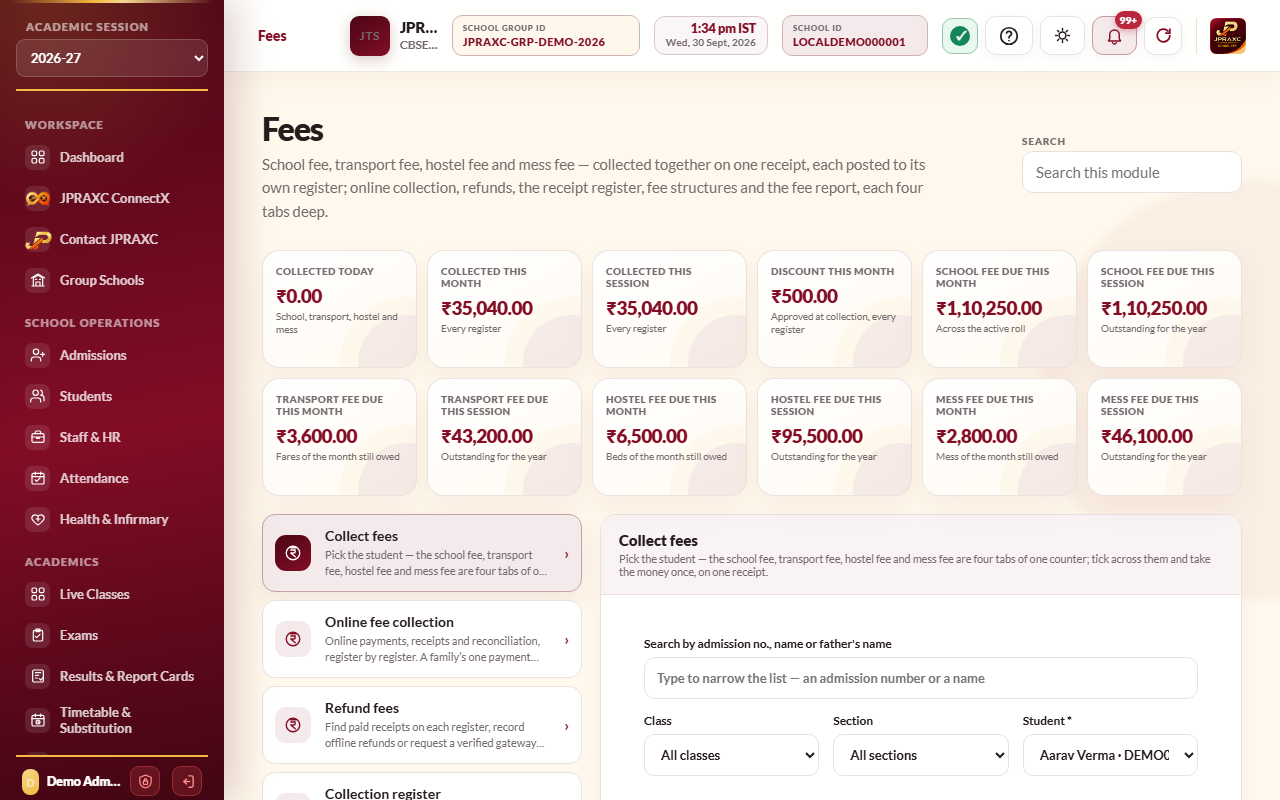
The fee counter is where the office takes money from a family. You pick the student once, and everything they owe is listed on four tabs: School fee, Transport fee, Hostel fee and Mess fee. You tick what the family is paying, across any of the tabs, and take the money once. The family gets one printed receipt with one collection number, and each register (school, transport, hostel, mess) still gets its own receipt number underneath, so every register's accounts stay separate.
Before you start#
- Your role needs access to the Fees module. To take a transport month or a hostel or mess month, your role also needs the right to post receipts in Transport management & tracking or Hostel management & attendance. If it does not, the tab says Your role cannot post transport receipts or Your role cannot post hostel receipts.
- The school fee must be set up first: fee heads and class allocations. See Set up fee structures.
- For transport fees the student needs a transport seat (see Transport and live bus tracking). For hostel and mess fees the student needs a hostel bed (see Hostel).
- Check the Academic session chosen in the sidebar. The Fees module works in that session.
Steps#
- Open Fees in the sidebar. The page opens on Collect fees. You can also use the Collect fees quick action on the Dashboard.
- Find the student. Type in Search by admission no., name or father's name, or narrow the list with Class and Section.
- Choose the student in the Student list. Their dues load on their own.
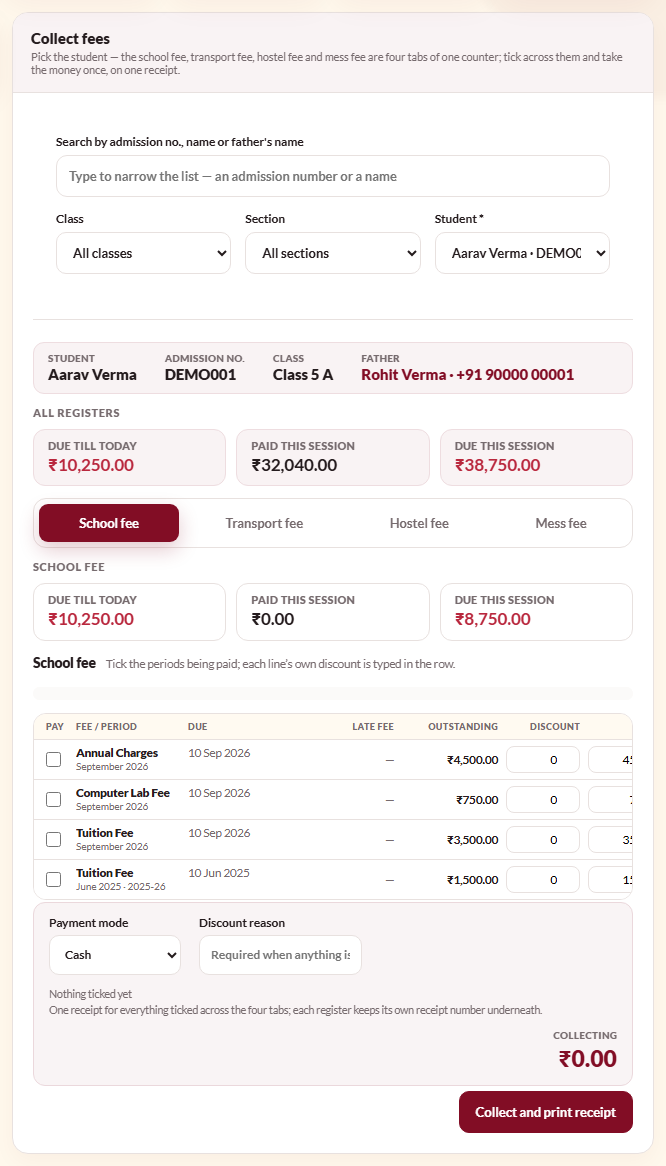
- Check the figure cards. All registers shows Due till today, Paid this session and Due this session across everything; each tab shows the same three figures for its own register.
- On the School fee tab, tick each period the family is paying for. Each row shows the fee and period, the due date, any late fee, the amount outstanding, a Discount box and the amount to collect.
- If the family is also paying transport, hostel or mess fees, open those tabs and tick the months being paid.
- To give a discount on a line, type the rupee amount in that line's Discount box. The amount to collect on that line updates as you type.
- To not charge a late fee on a line, tick waive in its late-fee column.
- Choose the Payment mode: Cash, UPI, Bank transfer, Cheque or Card.
- If you gave any discount or waived any fine, type the reason in Discount reason. It is required in that case.
- Check the Collecting figure and the summary beside it (for example, 2 school fees · 1 transport month). This is the amount the family should hand over.
- Select Collect and print receipt.
- The Fee Collection Receipt opens for printing. It lists each register's lines under its own heading, with that register's receipt number, and the total.
The student stays on the counter after the receipt is taken, and their figures refresh, so you can see what is still due.
What the rows tell you#
| What you see | What it means |
|---|---|
| Paid in the row | This period is fully settled. It cannot be ticked again. |
| Advance next to the due date | The period is not due yet. You can still collect it in advance. |
| A late fee with 3 days late under it | The fine this period has run up by today, after any grace days. |
| A dash in the late-fee column | No fine is charged. Point at the dash to see why. See Dues, reminders and late fees. |
| A transport or hostel month labelled arrears of 2025-26, or a school-fee period followed by an earlier session's name | An unpaid fee from an earlier session. It is settled on the same receipt, under the year it belongs to. |
Example#
Aarav Sharma (ADM-2026-001, Class 5 A) at Sunrise Public School owes the April tuition fee of ₹3,500 and the April transport fare of ₹1,200. His father pays both by UPI. The office ticks the April tuition line on School fee, the April line on Transport fee, chooses UPI and selects Collect and print receipt. The collection receipt shows ₹4,700 in total, with a school fee receipt number under the school section and a transport receipt number under the transport section.
Good to know#
- The late fee is worked out on the day you collect, from the due date and the grace days the school set. You do not type it.
- The late fee for a school-fee period is never charged for a month before the student's recorded admission date. This is deliberate. See Dues, reminders and late fees.
- A discount can never be more than what is outstanding on that line plus its fine.
- The hostel fee and the mess fee of a month are two separate lines on two tabs. You can take them together or one at a time.
- Unpaid fees from earlier sessions are listed with the current ones and can be settled on the same receipt.
- If your school has switched on the automatic Fee received message (in General Settings, under each message channel's configuration), the family is told that the school fee has arrived, with a link to view the receipt. See Notices and communication.
- Every receipt carries a verification code, so a printed copy can be checked later in Verify Documents. See Verify a document.
- To reprint, cancel or reverse a receipt later, use the Fee receipt register or Collection register. See Fee reports and registers.
Troubleshooting#
| Symptom | What to do |
|---|---|
| Tick at least one fee, month or stay to collect. | Tick at least one line on any of the four tabs before collecting. |
| Enter a reason for the approved discount. | You typed a discount or ticked waive. Fill in Discount reason. |
| No school fee is allocated to this student in this session. | No fee structure covers the student's class and section. Add one under Fee structure register & configuration. |
| A Class 11 or 12 student is missing stream fees | Stream fees are charged only to students whose record carries that stream. Record the stream on the student's record, then open the student again. |
| No transport seat is held by this student. | The student has no transport assignment. Assign one under Transport management & tracking. |
| This boarder has not opted for the mess. | The student's hostel allotment has no mess plan. Change the allotment under Hostel management & attendance if the student now takes meals. |
| A message says transport fee cannot be taken for a month because the ride had not started | The month is before the transport assignment began. Check the assignment's start date. |
